
Xiaomi makes an enormous range of phones, spanning the flagship Xiaomi numbered series, the value-focused Redmi line and the POCO family, sold in dozens of markets with different hardware configurations. That breadth is great for choice and terrible for giving a simple answer to "does my Xiaomi support eSIM." The truthful reply is that some do and some do not, and even two phones with the same model name can differ depending on where they were sold. So this guide deliberately avoids publishing a model-by-model verdict, because any such list would mislead someone. Instead you will learn the one on-device check that gives a correct answer for your exact phone, and then how to get a travel data plan running if that answer is yes.
Why we won't give you a Xiaomi eSIM model list
Search around and you will find confident lists claiming this Redmi or that POCO does or does not have eSIM. The problem is that Xiaomi configures regional variants differently, and eSIM availability is one of the things that changes between them. A model that ships with a working embedded SIM in one country may ship without it under the same name elsewhere. A blanket "supported models" list is therefore unreliable by design. Rather than repeat a claim that could be wrong for your specific unit, we send you to the only authority that is always right: your own phone's EID.
The check that actually settles it
Any phone with a genuine, active embedded SIM has an EID, a long number the device reports straight from its hardware. If your Xiaomi shows an EID, it supports eSIM. If it does not, nothing you install can change that. This single check outranks every spec sheet and forum post.
- Open the dialer and type *#06#. Among the identifiers that appear, look for a line labelled EID. Present means your phone supports eSIM.
- Then open Settings and go to the SIM area. On MIUI or HyperOS this is typically SIM cards & mobile networks, but the exact name and path vary by version. If there is an option to Add eSIM or use a downloaded profile, the feature is active.
EID present plus an Add eSIM option means you are ready to buy a plan. No EID and only physical-SIM options means this Xiaomi does not have an active eSIM, and you would use a nano-SIM for travel data instead. The same test works on any brand; the phone compatibility guide walks through it in general.
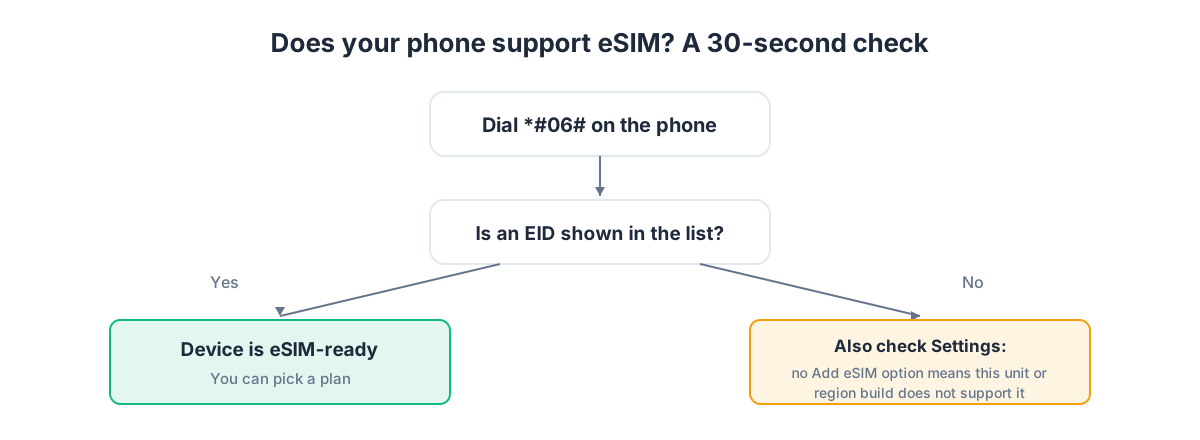
It is worth stressing why the EID is the deciding factor. Regional variants can share a name but differ in hardware activation; the EID is printed by the individual device, so it reflects what your phone can actually do, not what the model is supposed to do in general.
What a travel eSIM gives your Xiaomi
A Xiaomi with an active eSIM runs as a dual-SIM phone. Your home carrier stays on the physical SIM, keeping your regular number reachable, and a travel eSIM sits alongside it as a second line carrying data at local rates. You pick which line handles data, calls and texts.
A GetSim destination plan is usually data-only: it brings your phone online in the country you are visiting rather than assigning a local number. That suits travel perfectly, because maps, messaging apps, ride-hailing and translation all run on data, and you keep calling and messaging through your usual apps. If you specifically need a real number that can receive an SMS, that is a separate virtual number, a receive-only rented mobile number that operates on its own.
Pick the plan first
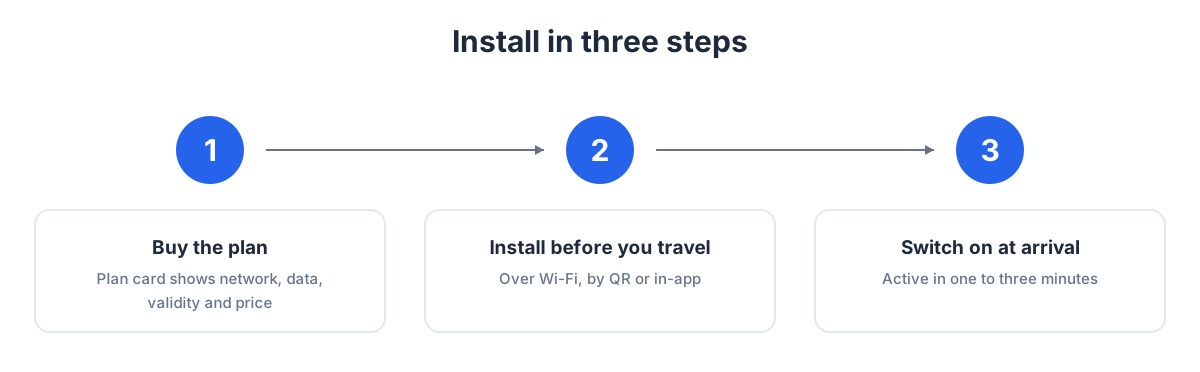
Buy before you install. GetSim covers 190+ destinations. Choose your country and the plan card shows the network, the data allowance, the validity period and the price before you pay. Visiting several countries in one trip? A single regional plan can cover the whole area rather than one eSIM per border.
Everything runs through one account and one shared prepaid wallet in the app. Top it up once and draw plans as you travel. Unused, unactivated plans carry a 7-day refund, so buying ahead of a flexible trip is low-risk.
Installing a travel eSIM on Xiaomi, step by step
Setup is quick. MIUI and HyperOS move menu labels around between versions, so the wording below is a guide, match it to the closest option on your build.
- Connect to Wi-Fi first. The profile downloads over the internet, so use home, hotel or airport Wi-Fi. Weak signal is the common cause of a stalled install.
- Open Settings > SIM cards & mobile networks (or the nearest equivalent).
- Tap Add eSIM or the option to add a downloaded plan, then choose to scan a QR code.
- Scan the QR code from your GetSim order so the phone downloads and installs the profile.
- Name the new line, for example "Travel", to distinguish it from your home number.
- Set the travel eSIM as your data SIM, and keep calls and texts on the home number.
- Turn on Data Roaming for the travel eSIM. A travel eSIM connects to partner networks in the destination, which the system counts as roaming for that line, so this switch must be on or there will be no internet despite a clean install.
Set up at home, activate abroad
If you are travelling soon, install before you go. The download works over any Wi-Fi, so do it at home the day before departure: add the eSIM, name it, set it as your data SIM, and keep Data Roaming for that line off until you land. On arrival, turn Data Roaming on and the phone connects on its own. For a fuller background, read what an eSIM is and the step-by-step install guide.
Dual-SIM and battery notes
Two active lines can raise battery use a little. On a trip, set mobile data to the travel eSIM only so the home line stops chasing roaming data in the background; it still rings and receives texts. Turn on Wi-Fi Calling for the home line and you will keep receiving calls and SMS to your usual number over any Wi-Fi at no roaming cost.
Topping up and reusing your eSIM
If you run low, top up in the app without reinstalling. The profile stays on the phone; you add data or extend validity to the same line. Next trip, keep the line and load a fresh plan from your wallet.
Stretching your data on a Xiaomi
MIUI and HyperOS include solid tools for keeping a travel plan lean. Open the data usage screen (under SIM cards & mobile networks or Connection & sharing, depending on version) and turn on Data saver to block background data except for apps you allow. The same area shows per-app consumption, so you can restrict whatever is quietly draining the plan. Set gallery and cloud backups to Wi-Fi only, and switch app store auto-updates to Wi-Fi only so a large update never downloads over cellular. Xiaomi phones also let you set data limits and warnings, which is handy on a fixed travel allowance.
As always, the big consumers are streaming video and video calls. An hour of standard-definition streaming or a long video chat can take a real bite out of a small plan, so save those for Wi-Fi and drop the quality when watching on cellular. Download offline maps for your destination before leaving Wi-Fi, so navigation barely touches the plan. If you are unsure how large a plan to buy, our guide to how much data you need for a trip gives working figures by activity.
eSIM versus a local SIM card
If your Xiaomi supports eSIM, is a local SIM from the airport worth it instead? Generally no. The embedded eSIM lets you buy and install before you land, keeps your home number safe in the physical tray, and avoids the kiosk queue and the risk of losing a tiny card. A local physical SIM only really pays off if you need a genuine local number for calls, which most travelers do not. For data alone, eSIM is faster and lower-risk. If your particular Xiaomi does not support eSIM, the choice becomes physical SIM versus roaming, and the eSIM vs roaming guide weighs those up.
Buying your next Xiaomi with eSIM in mind
If eSIM support matters for your next phone and you are eyeing a Redmi or POCO, verify the exact unit before you buy, ideally by dialing *#06# on a display model of the specific regional variant you would purchase. Do not trust the global spec page, since the version sold in your market may be configured differently. The principle is the same one this whole guide rests on: the device itself is the authority, not the model name. Once you have confirmed an EID, the setup steps above apply and you will be online abroad in minutes.
Xiaomi eSIM: decision table
| Result of your check | What it means |
|---|---|
| *#06# shows an EID and settings offer Add eSIM | Your phone supports eSIM; install a data-only travel plan |
| No EID and physical-SIM options only | This Xiaomi has no active eSIM; use a nano-SIM for data |
| Same model as a friend's but behaves differently | Regional variant difference; trust your own EID, not the name |
| Supported, multi-country trip | Choose a regional plan over one eSIM per border |
| Need to receive SMS on a real number | Add a receive-only virtual number alongside the data eSIM |
| Supported, leaving soon | Install over Wi-Fi now, enable roaming for the travel line on arrival |
Xiaomi eSIM questions
Does my Redmi or POCO support eSIM?
It depends on the exact model and region, so no list is dependable. Dial *#06#; if an EID appears, yours supports eSIM.
There's no eSIM option in my settings. Can I enable it somehow?
No. eSIM is hardware. With no EID, no app or software update can add it, and you would use a physical SIM for travel data.
My menus look different from your steps.
That is expected. MIUI and HyperOS paths vary by version, so look for the closest wording under SIM cards and mobile networks.
Installed but no internet?
Confirm Data Roaming is on for the travel eSIM and that it is your selected data SIM. That resolves nearly every case.
Can I install before travelling?
Yes. Download over home Wi-Fi and enable roaming on arrival. For a trip to Türkiye specifically, complete the final activation on arrival over local Wi-Fi.
Can I store two eSIMs on my Xiaomi?
Some Xiaomi, Redmi and POCO models can hold more than one eSIM profile, though how many can be active at once depends on the model. For travel you generally need only your home line plus one travel eSIM, and you choose the active data line in the SIM settings.
What happens when my travel plan runs out?
The profile stays on the phone; it simply runs out of data or validity. Top it up from the app to keep going, or load a new plan to the same line next trip. Nothing needs reinstalling.
A quick pre-flight checklist
If your Xiaomi passed the EID check, run through this before departure: buy the destination plan while you have easy Wi-Fi, install and name the eSIM, set it as your data SIM, turn on Wi-Fi Calling for your home line, and leave Data Roaming for the travel line off until you land. Do it the evening before rather than at the gate, so any small snag gets solved on home Wi-Fi with time in hand. On arrival, flip Data Roaming on for the travel line and you are online within a minute, without hunting for airport Wi-Fi.
The takeaway
With Xiaomi, Redmi and POCO phones, skip the model lists and let your device decide. Dial *#06#: an EID means eSIM is supported, no EID means it is not. If supported, buy your destination plan first, install over Wi-Fi, set the travel eSIM as your data line, keep your home number for calls, and enable Data Roaming for the travel line on arrival. If yours does not support eSIM, the eSIM vs roaming guide covers your alternatives.
Ready when you are
Put this guide to use on your next trip
Travel eSIMs that install in minutes and keep your home SIM active.