

Australia is a country of enormous distances, and that single fact shapes everything about staying connected there. A trip might mean a few days of city life in Sydney or Melbourne, then a long drive up the coast, then a stretch of genuine outback where the nearest town is hours away. Your phone is your map, your booking desk and your lifeline across all of it, so arriving with data already sorted matters more here than in most places. An Australia eSIM lets you do exactly that: set it up at home, land in the country connected, and skip the airport SIM counter entirely. This guide is honest about where coverage is superb and where it thins to nothing, and how to plan your data around a route rather than a single city.
Photo: Photoholgic / Unsplash
What an eSIM gives you for an Australian trip
An eSIM is a SIM that lives in your phone's software instead of a plastic tray. You load a data profile onto the chip already inside the device, which means you can buy and install a plan days before you travel and keep your home number active for calls and verification codes. For Australia, where you may be far from any shop for long stretches, having your connection arranged in advance is not a convenience, it is close to essential. GetSim runs data-first plans across 190+ destinations from one app and a single shared prepaid wallet, and the plan card shows the network, data allowance, validity and price before you pay. If a longer route means you need more data, you top up the same plan without reinstalling anything.
Coverage: brilliant on the coast, sparse in the interior
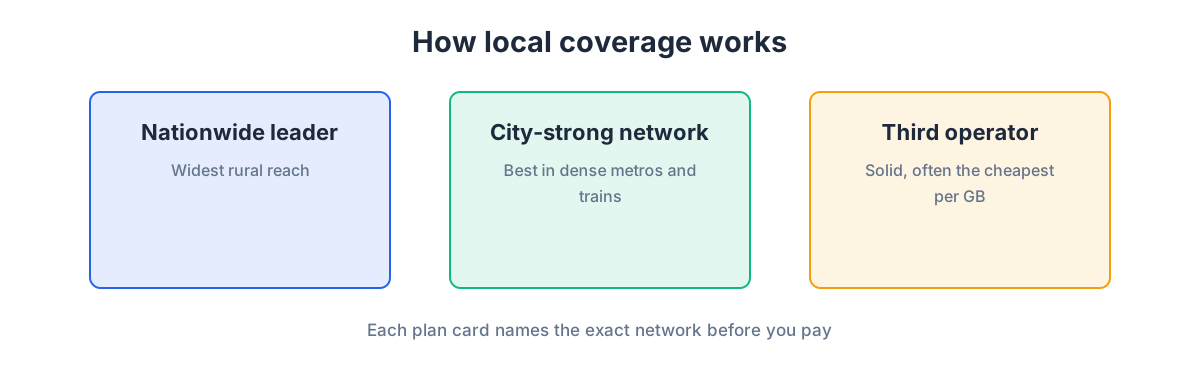
Here is the truth about Australia that generic guides gloss over: the population hugs the coast, and so does the mobile network. Along the eastern seaboard, Sydney, Brisbane, the Gold Coast, Melbourne, and in Perth and Adelaide, data is dense and dependable. Coastal highways and popular tourist corridors like the Great Ocean Road or the route up to Cairns are generally well covered near towns. The market follows a familiar shape: a nationwide leader whose reach into regional areas is the broadest, a strong city-focused challenger, and a third operator competing on value. The diagram below sketches that structure.
Now the other half of the truth: the outback is a different world. Once you leave the coastal strip and head inland, toward Uluru, across the Nullarbor, up through the Kimberley, or along remote parts of the Stuart Highway, coverage becomes intermittent and then disappears for long stretches. This is not a failing of any particular plan; it is simply the geography of a vast, thinly populated continent. A travel eSIM connects to a partner network, and the broadest-reaching networks carry furthest into regional areas, but no mobile signal blankets the deep interior. If your trip includes serious outback driving, plan for it: download offline maps covering your whole route, tell someone your itinerary, carry paper backups of key bookings, and for genuinely remote travel consider a dedicated satellite communicator that does not rely on cellular at all. For coastal and city travel, none of this applies and you will barely think about signal.
How much data a road trip really uses
Australia trips vary wildly in data appetite because they vary so much in shape. A city stay leans on maps, cafes and social media; a long road trip leans heavily on navigation, which runs for hours a day, plus streaming to pass the time between towns. Video, as always, is the big consumer. The budget diagram sorts usage into light, medium and heavy lanes so you can match your plan to your actual behaviour.
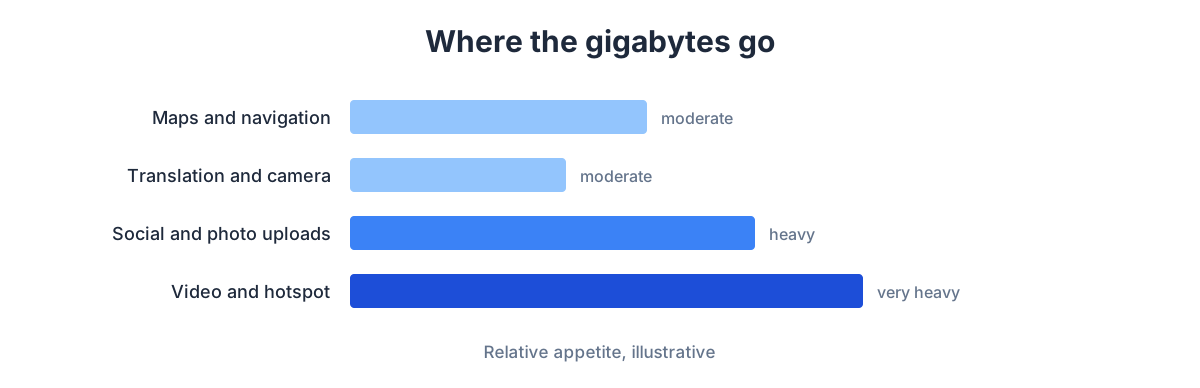
A useful way to think about it: constant turn-by-turn navigation on a road trip uses more data than people expect, though downloading offline maps for each region cuts that sharply. If you also stream music or podcasts on long drives and video-call home, step up a size. If you are working remotely from a camper van or hotspotting a laptop, buy generously. And because coverage vanishes in the interior anyway, the sensible pattern is to do your heavy downloading, offline maps, playlists, entertainment for the kids, while you still have signal and Wi-Fi in town.
Plan sizing by trip type
This table pairs common Australian itineraries with a data approach. Sizes are relative guidance rather than fixed promises.
| Trip type | Main data drivers | Approach |
|---|---|---|
| City stay (Sydney/Melbourne) | Maps, cafes, social | Small to mid plan |
| East coast road trip | Hours of navigation, streaming | Mid to large plan, offline maps |
| Outback expedition | Offline maps, minimal live data | Small plan plus heavy pre-downloads and a backup device |
| Beach and reef holiday | Social, photo uploads | Mid plan |
| Working while travelling | Video meetings, laptop hotspot | Large plan, expect top-ups |
Setting up before you board
Install your Australia eSIM at home, over your own Wi-Fi, before you fly. Because you are travelling to Australia from elsewhere, you can set everything up in advance, keep the profile dormant, and activate it when you land. Given how far apart shops and reliable Wi-Fi can be once you are in the country, arriving pre-configured is especially valuable here.
- Check your phone supports eSIM. Most recent iPhones, Pixels and Galaxy S models do; if unsure, our guide on checking eSIM support explains the quick test.
- Buy the Australia plan in the GetSim app, where the card shows network, data, validity and price before payment.
- Install the profile over home Wi-Fi. The app guides you; the eSIM shows up in your cellular or SIM settings.
- Label it, for example "Australia data", to keep it clear next to your home line.
- Leave the eSIM's data off until you land, then switch it on and set it as your data line.
For a menu-by-menu walkthrough on both platforms, see the install guide. Keep your home SIM in the phone for calls and codes, and let the Australian data plan carry the internet.
State by state: how coverage shifts as you travel
Australia's scale means the state you are in tells you a lot about what to expect. New South Wales and Victoria, home to Sydney and Melbourne and the busy corridor between them, are the best-covered parts of the country; the coastal drives, the Blue Mountains near Sydney and the Great Ocean Road out of Melbourne stay connected near towns and along the main routes. Queensland is a country of contrasts: Brisbane, the Gold Coast and the reef-access towns like Cairns and Port Douglas are well served, but the further north and inland you push, toward the Cape or the outback west, the sparser it gets.
Western Australia and the Northern Territory are where the wilderness dominates. Perth is a solid, well-covered city, but the moment you head up the coast toward Broome or inland across the vast interior, you are in territory where signal is intermittent and then absent for hundreds of kilometres. The route to Uluru in the Red Centre, and the long drive up the Stuart Highway, are classic examples: coverage clusters around roadhouses and towns and disappears in between. Tasmania sits somewhere friendlier, with good coverage around Hobart and Launceston and the popular touring routes, thinning in the mountainous interior and the remote southwest wilderness. Knowing which of these zones your itinerary crosses is the single best predictor of how much you will rely on offline preparation.
eSIM versus a physical SIM in Australia
Given the distances, the case for an eSIM over a local physical SIM is even stronger here than in a compact country. A physical SIM assumes you can reach a shop, which in much of Australia is a genuine assumption rather than a given; an eSIM you arranged at home needs no shop at all. You set it up before you fly, keep your home number in the phone for calls and codes, and land with data already running, whether you touch down in a major city or connect onward to a regional airport. The plan card shows network, data, validity and price before payment, so there is no counter-side guesswork.
Keeping the home SIM in place matters especially on a long Australian road trip, where you may need a bank confirmation or a two-factor code to book the next night's accommodation from the road. Swap in a full physical SIM and those messages can stop reaching you at the worst possible moment. The eSIM-for-data, home-line-for-identity split avoids that, and because the shared prepaid wallet carries across destinations, a hop onward to New Zealand or Asia later in the trip is a top-up rather than a fresh hunt for a store.
Smart habits for a big country
The recurring theme in Australia is preparation. Download offline maps for every leg of a road trip while you have signal, and cache entertainment for long, coverage-free drives. Use accommodation and cafe Wi-Fi for photo backups, app updates and big video calls. If you are travelling as a couple or family, one larger plan shared by hotspot can be simpler than several small ones, though hotspotting spends data faster. Turn off video autoplay to stop background drain.
Two more useful points. First, an unused, unactivated plan is refundable within seven days, so buying before a trip that might shift carries little downside. Second, the travel plan is data-only; if you need a number to receive an SMS confirmation from a tour operator or a two-factor code, you can add a receive-only virtual number alongside it.
What you will actually use your connection for
Thinking about the concrete moments a data plan smooths over in Australia helps you judge how much you need. In the cities, it is the ordinary rhythm of travel: maps to the next neighbourhood, public transport apps, restaurant and coffee searches, and a steady stream of photos shared home across the time difference. On a road trip, the emphasis swings hard toward navigation, which can run for hours a day, plus streaming music and podcasts to fill the long, beautiful drives, and checking the weather and road conditions before a mountain pass or a remote leg. Booking the next night's accommodation from the road is common too, which is exactly why keeping your home number reachable for a bank code can save a trip.
The wilderness legs flip the logic: there, the goal is not to use data live but to have downloaded everything you need before you lose signal, offline maps, trail notes, entertainment for the kids, and any bookings. Buy your plan around the mix of those phases rather than assuming constant streaming everywhere, and you will neither overpay for the empty stretches nor run short in the cities. Our guide on how much data you need for a trip goes deeper on matching an allowance to real habits, which is especially useful for a country where those habits change so much between legs.
Frequently asked questions
Will my eSIM work in the outback?
Not reliably. Coverage follows the coast and towns; the deep interior has long stretches with no cellular signal from any provider. Download offline maps, carry backups, and for serious remote travel consider a satellite device.
Is coverage good along the east coast?
Yes. The major cities and coastal corridors where most visitors travel are well served, and you will rarely think about signal there.
Can I keep my home number?
Yes. Your home SIM stays in the phone for calls and texts while the eSIM handles data. You pick which line carries data in settings.
How do I add data on a long trip?
Top up the same plan in the app, no reinstalling and no shop needed, thanks to the shared prepaid wallet. Do it while you have signal in a town.
Does navigation really use that much data?
Live turn-by-turn over many hours adds up, but downloading offline maps for each region beforehand reduces it dramatically and also protects you where there is no signal at all.
Get ready to explore
Australia rewards travellers who plan their connection around the country's scale rather than assuming city-style coverage everywhere. Set up an eSIM before you fly, download generously in town, and you will glide through the coast and cities while being properly prepared for the empty spaces in between. Browse the eSIM plans, confirm Australia on the countries page, and if a wider Pacific or Asia route is on the cards, the regional plans may fit better. If eSIMs are new to you, start with our explainer on what an eSIM is.
Ready when you are
Put this guide to use on your next trip
Travel eSIMs that install in minutes and keep your home SIM active.