
An eSIM is a SIM card that is already built into your phone. Instead of pushing a tiny plastic chip into a tray, you download a mobile plan onto a chip that is soldered to the mainboard, usually by scanning a QR code or tapping a button in an app. The word is short for "embedded SIM", and the "embedded" part is the whole point: there is nothing to post, nothing to collect from an airport kiosk, and nothing to lose down the side of a hotel bed. For anyone who travels, that small change rearranges the entire routine of getting online in a new country.
This guide explains what an eSIM actually is, how the profile lands on your phone, what happens to your normal number while you are away, and how a travel data plan behaves once you cross a border. It is written for people who have heard the term but never installed one, so it starts from zero and stays practical. If you already know the basics and just want the setup steps, our companion piece on how to install an eSIM on iPhone and Android walks through every screen.
A SIM you download instead of insert
Every phone that connects to a mobile network needs a SIM: a small secure chip that stores the credentials proving you are allowed to use that network. A physical SIM keeps those credentials on a removable card. An eSIM keeps the exact same kind of credentials in a rewritable chip inside the device. The technical name for that chip is the eUICC, and the plan you download onto it is called a "profile". One eUICC can hold several profiles at once, which is why a modern phone can carry your home number and a travel plan side by side without any hardware swap.
When you buy a travel plan, the seller does not mail you anything. They generate a profile on their systems and give you a way to pull it down: a QR code, a manual activation string, or a one-tap install link inside their app. Your phone contacts the network's provisioning server, verifies the profile, and writes it to the eUICC. From that moment the profile behaves like a SIM card that has always been in the phone. You can turn it on, turn it off, label it, and delete it, all from Settings.
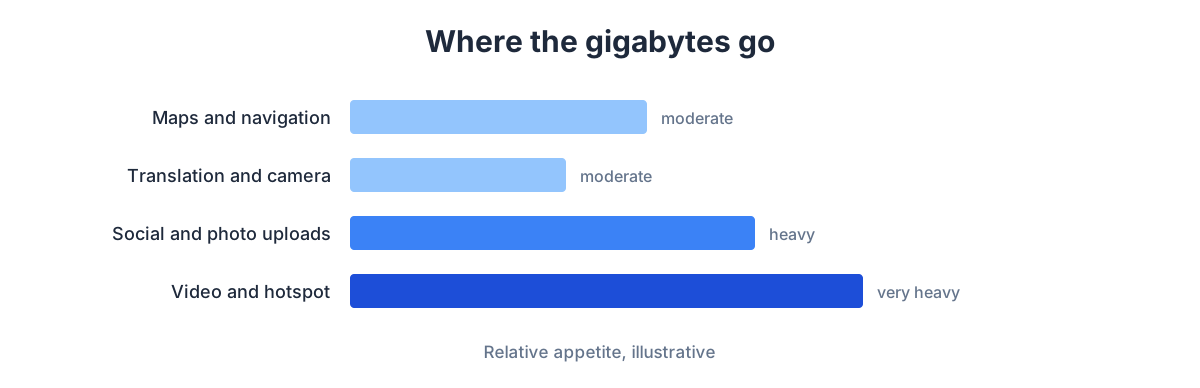
The diagram below shows the shape of a typical travel data budget, so you can see how a downloaded plan maps to real usage before you ever install one.
What happens to your normal number
This is the question that stops most people from trying an eSIM, so it deserves a clear answer. Installing a travel eSIM does not delete, cancel, or overwrite your home SIM. On a phone that supports two SIMs running together, your everyday number stays active in one slot while the travel plan sits in the other. You choose which one carries mobile data and which one handles calls and texts, and you can change that choice at any time.
The common travel setup looks like this: your home SIM stays switched on so you keep receiving important calls and bank verification texts on your usual number, but you turn its data roaming off so it never quietly runs up a bill. The travel eSIM becomes your data line, carrying maps, messaging, email and everything else. You get to keep your identity on your own number while paying local-style prices for the data you actually use. Because a travel data plan is data-only, you would use an internet-based calling or messaging app for voice, which is how most people already talk to family back home.
Why travelers moved to eSIM
The appeal is not the technology for its own sake; it is what the technology removes from a trip. A few pain points disappear at once.
- No airport queue. You can buy and install a plan from your sofa days before departure, then land with data already waiting. There is no counter to find, no passport to photocopy, no local-language paperwork.
- No lost SIM. Your home SIM never leaves the phone, so there is no loose card to misplace or forget to swap back when you get home.
- No bill shock. A travel plan is prepaid. You pay a set amount for a set allowance, and when the data is used you simply top up. There is no meter running in the background at roaming rates.
- Instant switching. Crossing into a new country or want a fresh plan? You add another profile without touching hardware.
With GetSim specifically, one app and one shared prepaid wallet cover more than 190 destinations, so the same balance you loaded for a summer trip is still there for the next one. You are not creating a new account and a new payment relationship every time you cross a border.
How a travel plan behaves once you arrive
Buying the plan and using the plan are two separate moments, and understanding the gap between them prevents almost every "why isn't it working" panic. When you buy, you are reserving an allowance. When you install and enable the profile, your phone starts looking for a partner network in your destination. When that network answers, your data begins to flow and, on most plans, your validity clock starts counting down from first use rather than from purchase.
Before you pay, the plan card shows you the network, the data amount, the validity window and the price, so there are no surprises hidden behind the checkout. You decide with all four numbers in front of you. Coverage in your destination comes from a real local network, which is why a travel eSIM feels like a normal local connection rather than a slow fallback. The mix of operators varies by country. In most markets there is one nationwide leader with the broadest reach, a strong challenger that performs well in cities, and a third operator that can be excellent in some regions and thinner in others. A travel plan connects you to a capable partner in that landscape without you having to pick sides.
The one timing rule for a Türkiye trip
There is a single scheduling quirk worth knowing if your destination is Türkiye. An eSIM installation cannot be completed while you are physically inside the country. The fix is simple and costs nothing extra: buy your plan whenever you like, but do the actual install on arrival, over the airport or hotel Wi-Fi, rather than trying to finish it before you land there. For every other destination, the friendly rule is the opposite. If you are already at home and about to fly, install and test the profile before you leave, while you have solid Wi-Fi and time to spare. Then it is ready the instant your plane touches down.
Setting one up, start to finish
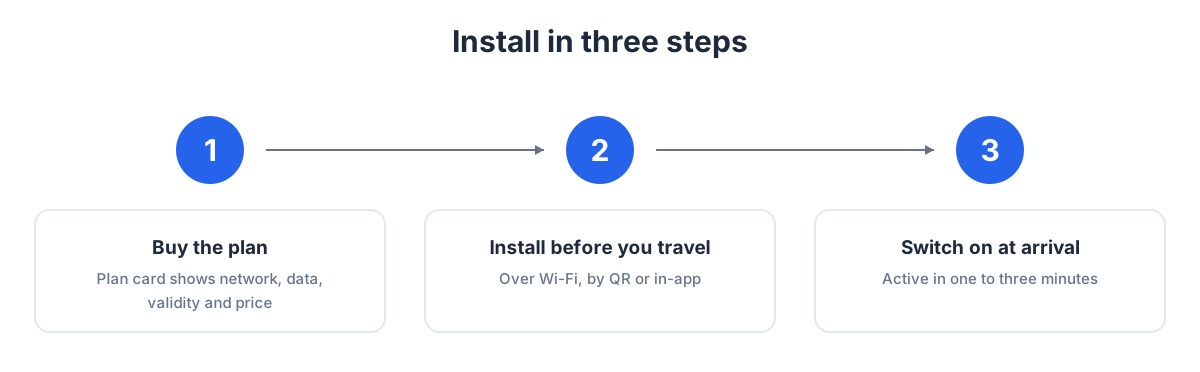
The whole process fits into a handful of steps, shown in the flow below and expanded in our full installation guide.
- Check your phone is ready. Most phones released in recent years support eSIM, but it is worth confirming before you buy. Our guide on how to check if your phone supports eSIM shows the 30-second test.
- Buy a plan for your destination. Browse plans by country on the eSIM countries pages, or start from the main eSIM hub if you are still deciding where you are going.
- Install the profile. Scan the QR code, or use the one-tap install in the app. This writes the profile to your phone.
- Set it as your data line and enable roaming for it. This last toggle trips people up: the travel line needs data roaming switched on so it can use its partner network abroad. Your home line keeps its roaming off.
eSIM vs a physical travel SIM
If you have used a local prepaid SIM on past trips, a quick side-by-side helps you see what actually changes.
| Aspect | Physical travel SIM | Travel eSIM |
|---|---|---|
| Getting it | Buy in person, often at the airport or a shop | Buy online in minutes, before you leave |
| Your home number | Removed from the phone while the SIM is swapped | Stays in the phone, still reachable |
| Setup | Insert card, sometimes register with ID | Scan a code, toggle a setting |
| Switching countries | New card each time | Add another profile in the same app |
| Risk of loss | Small loose card to keep track of | Nothing physical to lose |
| Topping up | Varies by shop and language | Top up in-app without reinstalling |
Where the eSIM came from
The embedded SIM was not invented for travelers; it grew out of a wider industry effort to shrink the SIM and make it programmable. Physical SIM cards had already been shrinking for years, from the credit-card-sized originals down to mini, micro and nano, each step freeing space inside ever-thinner phones. The eSIM removed the tray altogether and, more importantly, made the credentials software you could load and reload. That same technology now sits in watches, tablets and connected cars, which is why your smartwatch can have its own number without a card slot. Travel is simply the use case where the benefits are most obvious to an ordinary person, because it turns "find a shop, buy a card, swap it in" into "tap a button before you leave".
Understanding that lineage helps because it explains why an eSIM behaves so much like the SIM you already know. Nothing about how your phone connects to a network changed. The security model is the same, the network sees the same kind of credentials, and the experience once connected is indistinguishable. Only the delivery method changed, from a physical object handed over a counter to a profile downloaded over the internet. Everything else that made SIM cards reliable for decades carries straight over.
What an eSIM is not
A couple of clarifications save confusion. An eSIM is not a phone number in the traditional sense of a line you hand out for calls; a travel data plan is data-only. If what you actually want is a mobile number to receive calls or verification texts, that is a different product. GetSim offers receive-only rented mobile numbers as a separate virtual number service, useful for signing up to services that demand a local number. An eSIM data plan and a virtual number solve different problems, and you can use both at once if you need to.
An eSIM is also not a magic Wi-Fi replacement that works with no coverage. It relies on the same cell towers every phone uses, so in a remote valley with no signal, an eSIM has nothing to connect to either. What it gives you is a clean, prepaid way to use those towers at sensible prices wherever coverage exists.
Frequently asked questions
Does an eSIM use more battery?
No more than a physical SIM. It is the same kind of radio connection. Running two lines at once can use marginally more power because the phone maintains two registrations, but the difference is small enough that most people never notice it.
Can I move an eSIM to a new phone?
A profile is tied to the device it was installed on, so it does not transfer as easily as popping out a plastic card. When you change phones, you install a fresh profile on the new device. Because everything lives in one app and one wallet, that is a quick job rather than a chore.
What if I run out of data?
You top up. Adding more data does not require reinstalling anything, and because the balance is shared and prepaid, you are only ever paying for what you choose to add. If you are not sure how much to buy in the first place, our guide on how much data you need for a trip gives realistic figures for different travel styles.
Is an eSIM better than roaming with my home plan?
For most trips, a travel eSIM is the cheaper and more predictable choice, because you pay a set price rather than per-megabyte roaming rates. There are cases where a home roaming add-on makes sense, and we weigh them in detail in eSIM vs roaming.
Do I need to cancel it when I get home?
There is nothing to cancel. A prepaid travel plan simply stops when its data or validity runs out. You can delete the profile from Settings if you like, or leave it in place. And if your plan was never activated, GetSim offers a 7-day refund window for unused, unactivated plans, so buying ahead carries no risk if your trip changes.
The short version
An eSIM is a SIM you download instead of insert. It lets you keep your own number in your phone while carrying a separate, prepaid data plan for wherever you are going, all managed from one app and one wallet. You buy it before you travel, install it with a QR code, enable roaming on the travel line, and land connected. When you are ready to pick a plan, start at the eSIM hub or browse destinations, and if you are visiting several countries in a region, the regional plans keep you covered across borders without a new profile at every stop.
Ready when you are
Put this guide to use on your next trip
Travel eSIMs that install in minutes and keep your home SIM active.