

The United States is one of those trips where your phone stops being a convenience and becomes infrastructure. Rideshare apps, gate changes texted to you at the airport, restaurant waitlists that ping your number, mapping across a city grid you have never walked before. A USA eSIM lets you land at JFK, LAX or O'Hare and walk out already online, without hunting for a SIM kiosk or paying whatever your home carrier charges for a day of roaming. This guide covers what coverage actually looks like across such a large country, how much data a typical trip burns through, and how to get the profile installed correctly the first time.
Photo: Andreas M / Unsplash
With a GetSim USA plan the model is simple. You buy a data plan before you fly, the plan card shows you the network type, the data amount, the validity window and the price before you pay anything, and the profile installs onto the eSIM slot your phone already has. Most travel plans are data-only, which is the right shape for the way people use a phone abroad: maps, messaging, calls over WhatsApp or FaceTime, boarding passes, and the occasional bout of doomscrolling on a long Amtrak leg. GetSim covers 190+ destinations from one app and one shared prepaid wallet, so the USA plan lives next to any other country you add later.
How coverage works across a country this big
The first thing to understand about the United States is scale. Coverage that feels flawless in Manhattan behaves differently on a two-lane road through rural Montana, and the gap between them is larger than the gap between two European countries. Travel eSIM data rides on one of the established nationwide host networks, and in dense areas, that is a non-issue: downtown Chicago, the Las Vegas Strip, central Boston, the theme-park corridors of Orlando all have thick, redundant coverage. The places to keep expectations realistic are the long interstate stretches, desert national parks, and mountain valleys where even domestic subscribers see their signal drop to a single bar.
The generic way to think about it, and the way the network diagram below frames it, is a tiered picture: a nationwide leader with the broadest rural reach, a strong-in-cities competitor whose footprint is excellent in metros but thinner off the highway, and a third operator that fills in more territory over time. You are not choosing among these by hand on a travel plan. The point of the diagram is to set the mental model, so that if you are planning a road trip through Utah's national parks you download your offline maps and a couple of playlists before you leave the last town with full bars.
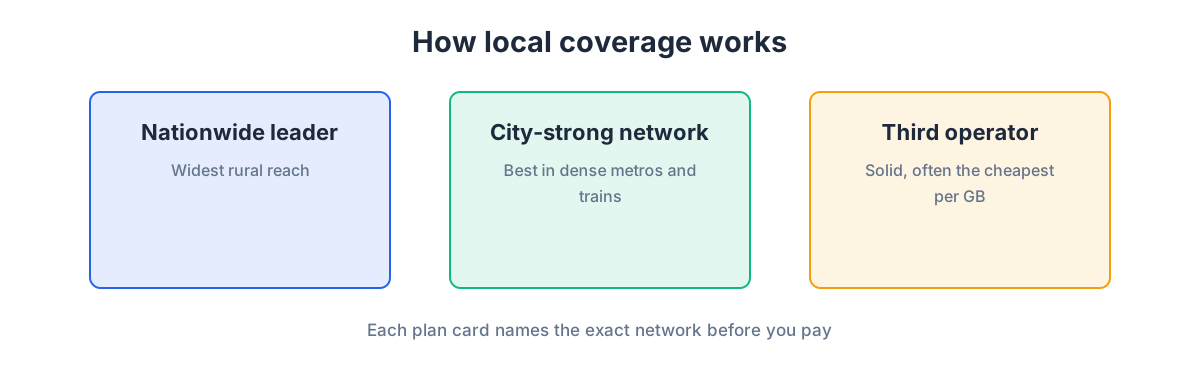
For a first-time visitor the practical takeaway is this: in every city you are likely to visit, and along the major corridors between them, a USA eSIM behaves like a normal local connection. In the genuinely remote parts of the country, no plan of any kind, local or travel, delivers a city-grade signal, so plan your downloads accordingly rather than blaming the eSIM.
How much data a US trip actually uses
People routinely over-buy or under-buy because they guess instead of estimating. The honest way to size a plan is to look at how you personally travel. Maps are the workhorse of an American trip because distances are long and you will navigate constantly, yet turn-by-turn navigation is surprisingly light on data when the map tiles are cached. The heavy consumers are the things you do to relax: video streaming in the hotel, uploading photo and video dumps to the cloud, and video calls home across time zones.
The data-budget diagram breaks a day into the typical buckets so you can add up your own profile rather than trusting a single number.
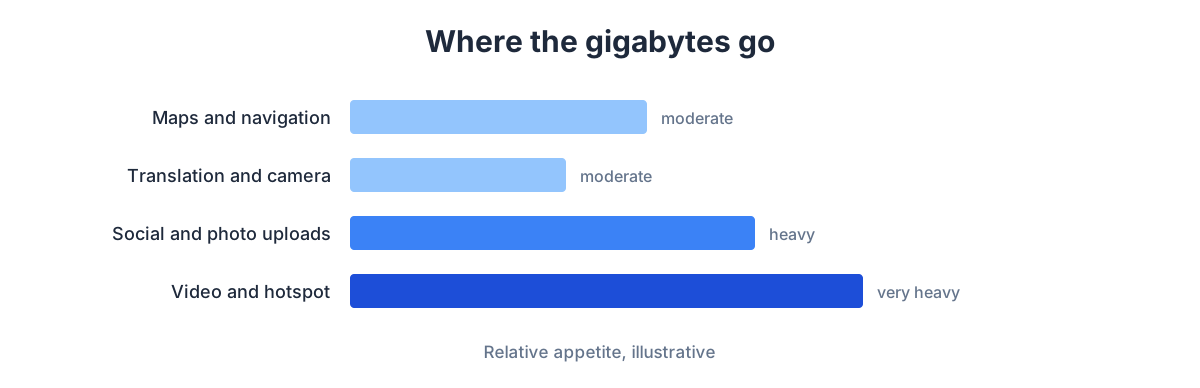
As a rule of thumb, a light user who mostly navigates, messages and checks email can run comfortably on a small daily allowance. A moderate user who scrolls social media over coffee, shares stories and takes the odd video call needs meaningfully more. A heavy user who streams shows in the evening and backs up 4K video from a day at the Grand Canyon should buy generously or plan to top up. And that is the quiet advantage of the eSIM model: if you misjudge, you top up from the app in seconds without reinstalling anything, so it is fine to start conservative and add more once you see your real daily burn. If you want to work through the estimate more carefully, our guide on how much data you need for a trip walks through the same buckets with worked examples.
Buying and installing before you fly
The sequence that saves people the most stress is to buy and install while you are still at home on your own Wi-Fi, days before departure. A traveler already at home installs the eSIM profile there, well ahead of the flight, and simply switches it on after landing. That way the fiddly part, scanning the profile and letting it provision, happens on a stable connection with time to spare, not while you are standing in an arrivals hall with a dying battery.
The steps look like this on both platforms. Buy the USA plan in the app and confirm the plan card details. Open your phone's cellular settings and add the eSIM (the app either shows a QR code or installs the profile directly). Give the line a clear label like "USA data" so you can tell it apart from your home SIM. Then leave data roaming for that travel line turned on, because from the network's point of view you are roaming onto a US host network even though there are no roaming charges on your GetSim plan, and set the travel line as your data line while keeping your home number available for calls and texts. For a screen-by-screen version, see how to install an eSIM on iPhone and Android.
Before any of this, make sure the phone itself is compatible. Most recent iPhones, Pixels and flagship Galaxy models support eSIM, but the fastest way to be certain is to dial *#06# and check for an EID number, or look in settings for an "Add eSIM" option. Our phone compatibility guide covers the check in detail. If you are still shopping for the plan, you can browse the eSIM plans directly or open the full country list to line up the USA alongside anywhere else on your itinerary.
At the airport and beyond
When you land, connect airport Wi-Fi briefly if you like, but the eSIM should latch onto a US network on its own within a minute or two of taking the phone off airplane mode. Confirm the travel line is selected for data, load your rideshare app, and you are moving. There is no counter to visit and no physical SIM to swap, which matters more than it sounds when you are jet-lagged and just want to get to the hotel.
A few US-specific habits pay off. Tipping apps, mobile ordering and parking meters all assume a live connection, so keep the travel line active rather than leaning on café Wi-Fi. Text-message verification codes are the one thing a data-only plan cannot receive, since those go to a phone number, not a data line. If a US service insists on texting a code to a local number, that is exactly the gap a virtual number fills: a receive-only rented mobile number you can use to catch SMS codes, kept in the same app and wallet as your data plan.
Multi-city and multi-country routing
Plenty of trips are not just the USA. A common pattern is a few days in New York, then onward to Canada, or a west-coast loop that dips into Mexico. Because everything lives in one app and one shared wallet, you can add a Canada or Mexico plan without starting over, and if your route spans a whole area it can be worth checking whether a regional plan fits better than several single-country ones. The wallet balance is shared across all of it, so topping up once covers whatever plan you activate next.
If your trip also includes European legs, the same logic applies. Travelers often pair a US plan with, say, an eSIM for the United Kingdom on a transatlantic itinerary, or line the USA up next to a Canada eSIM for a cross-border road trip. Each plan is independent, but they share the same install flow you have already learned.
Choosing the right USA plan: a quick comparison
Rather than a single recommendation, it helps to match the plan to the trip. The table below is qualitative on purpose, since prices and exact allowances are shown on the plan card at purchase, not invented here.
| Traveler type | Typical usage | Plan approach |
|---|---|---|
| Business, few days | Email, maps, calls over data, light browsing | Smaller allowance, short validity; top up if a call-heavy day appears |
| City break, one week | Maps, social, photos, some streaming | Mid-size daily budget; comfortable headroom for evenings |
| Road trip, two weeks | Constant navigation, offline downloads, video backups | Larger allowance and longer validity; pre-download maps for remote legs |
| Family holiday | Multiple devices via hotspot, streaming for kids | Generous plan on one phone acting as hotspot; monitor and top up |
Whatever you pick, the plan card is the source of truth. Network type, data, validity and price are all on screen before you pay, and there is a 7-day refund on plans that stay unused and unactivated, so buying a little early to be safe carries no penalty.
Keeping your bill predictable
The single biggest reason travelers turn to an eSIM for the USA is cost certainty. A travel plan is bought up front at a price you saw on the plan card, so there is no meter running against your home account and no bill shock waiting when you get home. The mechanics that make that work are worth spelling out. Your home SIM stays in the phone for your number, but you switch its data roaming off, which is the setting that quietly generates roaming charges. All data then flows through the USA eSIM, which has a fixed allowance you can watch in the app. If you approach the limit, you top up deliberately, so spending is always a choice you make rather than something that happens to you.
Two smaller habits sharpen this further. First, let large uploads, full-resolution photo and video backups, cloud sync, app updates, wait for hotel Wi-Fi rather than the cellular plan, since those are the tasks most likely to eat an allowance quickly. Second, if you are traveling as a group or family, it is often cheaper to put a generous plan on one phone and share it by hotspot than to buy several small plans, and because tethering behaves like a normal connection, that works fine. When a US trip is one leg of a longer journey, the shared prepaid wallet keeps the whole thing in one place, so you are never juggling separate balances country by country.
Frequently asked questions
Will one USA plan work in every state?
Yes. A USA plan is a national plan, so it works the same in Florida as in Washington. What varies is not the plan but the underlying signal, which is dense in cities and along major corridors and thinner in remote areas, exactly as it is for local subscribers.
Can I make normal phone calls?
Travel plans are data-only, so you call and message over data through apps like WhatsApp, FaceTime or your usual messenger. Your home number can stay reachable on your other line for the calls that genuinely need it, and if you need to receive US SMS codes, add a virtual number.
What if I run out of data mid-trip?
Top up from the app in seconds. There is no reinstalling and no new profile to scan, since the top-up adds to the plan you already have running.
Should I keep my home SIM active?
Keep it in the phone for your home number, but turn its data roaming off so it does not quietly rack up charges. Let the USA eSIM handle all data, and you get the best of both.
When exactly should I install?
Install at home on Wi-Fi a day or two before you fly, label the line clearly, and switch it on after you land. That keeps the provisioning step off your arrival-day critical path.
A USA eSIM removes the two classic frictions of an American trip, the airport SIM hunt and the surprise roaming bill, and replaces them with a plan you set up at your kitchen table. Size it to how you actually travel, install it early, keep your home number on a second line for the odd verification text, and lean on a virtual number when a US service insists on an SMS. Do that and your phone stays exactly what it should be on a big trip: the thing that just works.
Ready when you are
Put this guide to use on your next trip
Travel eSIMs that install in minutes and keep your home SIM active.