

Japan is a country where a connected phone quietly does half the work of travelling. Train times down to the minute, station exits numbered so precisely that a map pin is the difference between the right platform and a ten-minute detour, translation apps pointed at a menu, cashless payment in convenience stores, and route planning across one of the densest rail networks on earth. A Japan eSIM means you land at Narita, Haneda or Kansai already online, ready to navigate the Yamanote Line and translate a ramen menu before you have even found the airport express. This guide walks a visitor through coverage across the country, how much data Japan's particular travel style burns, and how to set everything up so arrival is effortless.
Photo: JJ Ying / Unsplash
The GetSim model fits Japan well. You buy a Japan data plan before departure, the plan card spells out the network, the data, the validity and the price before you pay, and the profile installs onto your phone's existing eSIM slot. Most travel plans are data-only, which matches how people use a phone in Japan almost exactly, since maps, messaging, calls over apps, translation and QR payments all run on data. Japan is one of 190+ destinations in a single app on one shared prepaid wallet, so it slots neatly into a wider Asia trip.
Coverage across the archipelago
Japan has some of the most consistent mobile coverage of any destination, which is good news for a first-time visitor. The greater Tokyo area, Osaka, Kyoto, Nagoya, Fukuoka and Sapporo are blanketed, and the coverage extends impressively into the transport layer: you will keep a signal on most subway lines, inside major stations, and along the Shinkansen routes that connect the main cities, with only short interruptions in the longest tunnels.
The places to keep expectations grounded are the rural and mountainous fringes, the interior of Hokkaido, remote hot-spring valleys, hiking trails in the Japanese Alps, and small islands. Even there coverage is often better than travelers expect, but it is not guaranteed. The network diagram below is best read as a hedged, tiered picture: a nationwide leader with the broadest reach, a strong-in-cities competitor, and a third operator, with your travel data riding on established host infrastructure rather than something you select manually.
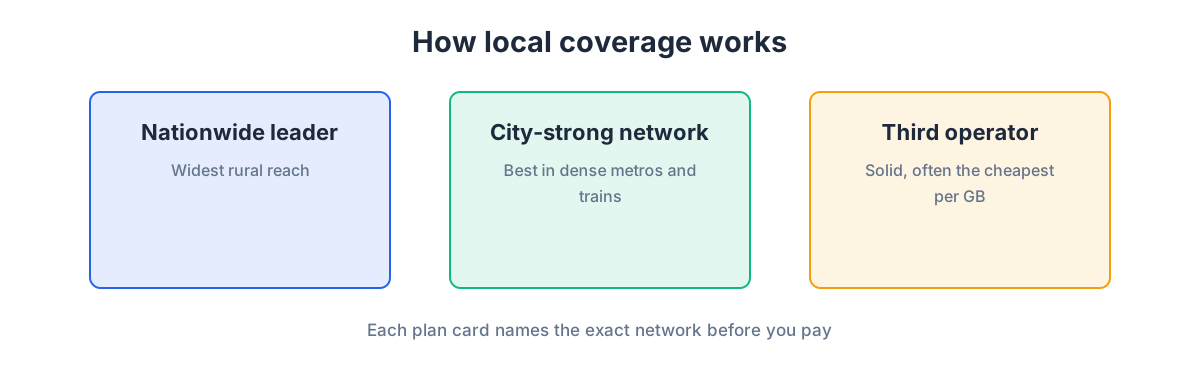
In practice, across every city and along every major rail line you are likely to ride, a Japan eSIM behaves like a strong local connection. Before a day hike in the mountains or a trip to a small island, cache your offline maps and route, and you are covered for the rare gaps.
How much data Japan really needs
Japan's data profile is shaped by three things visitors do constantly: navigate a complex rail and subway system, translate text on the fly, and photograph a country that is relentlessly photogenic. Navigation and messaging are light once map tiles cache. Live translation of camera images, video calls, evening streaming and cloud photo backups are the heavier draws, and Japan tends to generate a lot of photos.
The data-budget diagram below splits a day into buckets so you can total up your own realistic figure instead of guessing.
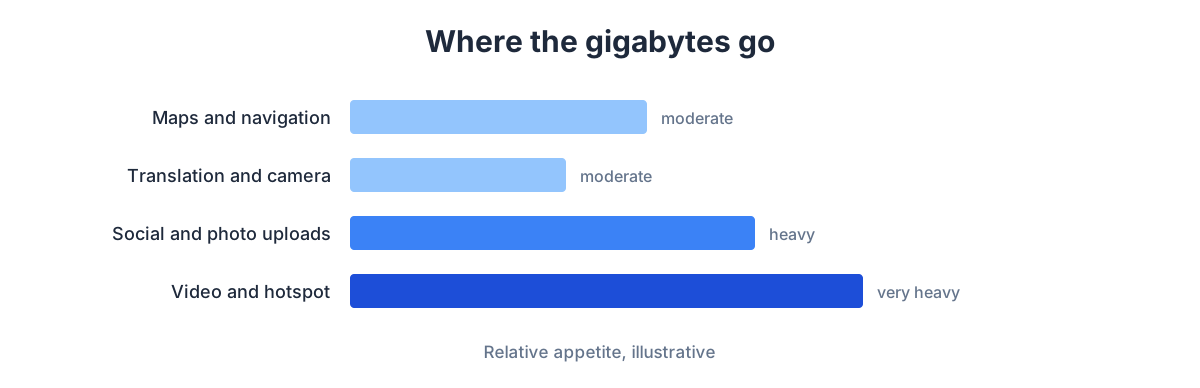
A light user, navigating and messaging with the odd translation, runs on a small daily allowance. A moderate user translating menus and signs, posting to social, and taking video calls needs more. A heavy user streaming in the evening and backing up video from Kyoto's temples should buy generously. Since top-ups happen in seconds in the app with no reinstall, start modest and add data once your real daily use is clear. For a careful estimate, see how much data you need for a trip.
Getting set up before you land
Install the eSIM at home on Wi-Fi a day or two before flying. A traveler already at home provisions the profile there and simply enables it after landing, keeping the fiddly step off your arrival schedule, which matters extra in Japan where you may want to catch a specific airport express within minutes of clearing customs. The flow is the same across platforms: buy the Japan plan and check the plan card, add the eSIM in cellular settings via QR or direct install, label it clearly like "Japan data", and turn on data roaming for that travel line (you are roaming onto a Japanese host network, but with no roaming charges on the GetSim plan). Set the travel line as your data line and keep your home number on your other line. The screen-by-screen version is in how to install an eSIM on iPhone and Android.
Check compatibility first: recent iPhones, Pixels and flagship Galaxy models generally support eSIM, and the sure test is dialing *#06# for an EID or finding "Add eSIM" in settings, as the phone compatibility guide explains. To browse, open the eSIM plans or the full country list and add Japan alongside the rest of your route.
Arrival, trains and daily life online
Once you land and leave airplane mode, the eSIM should register on a Japanese network within a minute or two. Confirm the travel line is your data line, load your transit app, and you can navigate straight to the right platform. Japan rewards a live connection more than most places: IC-card and mobile transit apps, precise station and exit navigation, real-time train status when a line is delayed, and instant translation of signs and menus all assume you are online.
Keep the eSIM as your active data line rather than relying on scattered Wi-Fi, so translation and transit info are always ready. Remember the data-only limitation too: SMS verification codes go to a phone number, not a data line. If a Japanese service, a booking site, a payment app, or accommodation, insists on texting a code to a local number, a virtual number (a receive-only rented mobile number in the same app) handles it cleanly.
Multi-stop Asia trips
Japan is often one stop on a longer Asian itinerary, paired with Korea, Taiwan, or a Southeast Asia leg. Because every plan lives in one app on a shared wallet, adding the next country takes seconds, and for a route spanning several countries it is worth comparing a regional plan against separate single-country plans. The shared balance means one top-up covers whatever you activate next.
Travelers frequently line Japan up with other destinations they can set up the same way, such as a Thailand eSIM for a beach extension or a Singapore eSIM as a hub stopover. Each installs with the flow you have already practised, so the second and third countries are faster than the first.
Matching a plan to your Japan trip
Rather than one recommendation, match the plan to your style of travel. The table is qualitative on purpose; exact data and price show on the plan card at purchase.
| Trip style | What you'll do | Plan approach |
|---|---|---|
| Tokyo city break | Subway navigation, translation, social, some streaming | Mid-size daily budget with evening headroom |
| Golden Route (Tokyo-Kyoto-Osaka) | Shinkansen, heavy navigation, lots of photos | Larger allowance, longer validity; cache maps for day trips |
| Rural and Hokkaido | Navigation with offline backup, fewer streams | Moderate plan; expect occasional signal gaps |
| Business, few days | Email, maps, calls over data, translation | Smaller allowance, short validity; top up on busy days |
The plan card remains the source of truth for network, data, validity and price, and unused, unactivated plans keep a 7-day refund, so buying a little early is risk-free.
Keeping your spending predictable
Cost certainty is a big part of why travelers choose an eSIM for Japan. The plan is bought up front at the price shown on the plan card, so nothing meters against your home account and no roaming bill follows you home. The setup that guarantees this is simple: leave your home SIM in the phone for your number but switch its data roaming off, and let the Japan eSIM carry all data on its fixed allowance, which you can watch in the app. If you near the limit, you top up on purpose rather than discovering a charge after the trip. Because top-ups are instant and need no reinstall, starting with a modest plan and adding data is a genuinely low-risk strategy.
Two habits help a Japan plan last. Send the heavy tasks, full-resolution photo and video backups, cloud sync, large app updates, over hotel Wi-Fi rather than the cellular allowance, since a photogenic country produces a lot of media. And if you are traveling as a pair or family, one generous plan shared by hotspot usually beats several small separate plans, because tethering works like a normal connection. On a longer Asian itinerary the shared prepaid wallet keeps every country in one balance, so you manage a single top-up rather than juggling accounts at each border.
Japan-specific practicalities worth knowing
A few things about Japan reward a little foresight. Cashless payment has spread quickly, and while a QR or IC-card tap does not need much data, the apps that manage balances and history do, so keeping the eSIM active smooths daily life in convenience stores and stations. Navigation in Japan is unusually precise, station exits are numbered and the right one saves real walking, and that precision depends on a live connection and up-to-date transit data, which is another argument for staying on the eSIM rather than hunting for free Wi-Fi. Translation is the other everyday tool: with signal, live camera translation of menus and signs works wherever you are, but downloading an offline language pack before you go is sensible insurance for the mountains and islands. Finally, if a day trip takes you deep into rural Hokkaido or onto a small island, cache your maps and route in the city first, so a rare signal gap never leaves you stranded.
Frequently asked questions
Does one Japan plan work in Kyoto, Osaka and Hokkaido?
Yes, a Japan plan is national. It works the same everywhere; only the underlying signal varies, excellent in cities and along rail lines, occasionally patchy in remote mountains and islands, as it is for local users.
Will I have signal on the Shinkansen and subway?
Mostly yes. Subways and bullet-train routes are well covered, with brief drops in the longest tunnels. Downloading your route in advance smooths over the gaps.
Can I use translation apps offline?
Many translation apps offer offline language packs; download them before you go as a backup. With the eSIM active, live camera translation of menus and signs works wherever you have signal.
How do I receive a Japanese SMS code?
Data-only plans cannot receive SMS. Add a virtual number to catch verification codes on a receive-only number, held in the same app and wallet.
What about my home number?
Keep your home SIM in the phone for your number but disable its data roaming, so all data flows through the Japan eSIM with no surprise charges. You still receive calls and texts to your home number on that line if you leave it enabled, while the eSIM quietly handles everything data-related in the background.
A short pre-departure checklist
A quick run-through the night before departure keeps arrival smooth. Confirm eSIM support with the *#06# EID check if you have not already. Buy the Japan plan and read the plan card so you know your network, data, validity and price. Install the profile on home Wi-Fi and label the line clearly. Set data roaming on for the Japan line and off for your home line. Download an offline translation pack and cache maps for any rural day trips. And if a Japanese service will need to text you a verification code, add a virtual number before you fly. Six small steps, and landing in Japan is just a walk to the airport express.
A Japan eSIM removes the one thing that can make an otherwise seamless country stressful: being offline in an unfamiliar rail system with a menu you cannot read. Size your data around trains, translation and photos, install at home before you fly, keep your home number on a second line, and add a virtual number when a Japanese service wants to text you. Then Japan does what it does best, running like clockwork, with your phone keeping perfect time alongside it.
Ready when you are
Put this guide to use on your next trip
Travel eSIMs that install in minutes and keep your home SIM active.